
Ready Motion Control

Ready Motion Control

The Easy Industral CNC Motion Controller

Menu

  • Home
  • Support
    • How To Videos
    • Connecting To Ready Motion
    • Wiring Ready Motion
    • Ready Motion User Interface
    • Programming Ready Motion
    • G Code Generator Software
  • Products / Store
    • My Account
    • Cart
  • Contact

Setup

Ready Motion User Interface

The software is built into the Ready Motion System.  The User Interface is networked based so you can access the motion controller from a computer, phone or tablet using any operating system you want as long as there is a web browser.

Ready Motion Admin December 17, 2016December 15, 2017 Setup, Uncategorized No Comments Read more

Programming Ready Motion

Programming Basics The Ready Motion Controller uses the G CODE language. G-code is relatively easy to read. It consists of commands (which start with G, and some with M) followed by parameters. G0 moves as fast as the machine can go and

Ready Motion Admin December 9, 2016June 2, 2019 Setup Read more

Wiring Ready Motion

Learn below how to wire relay boards, steppers, limit boards and the physical button pendent. We designed wiring the Ready Motion Controller to be as easy as possible and as minimal as we could. If you have any questions please call

Ready Motion Admin December 9, 2016July 24, 2017 Setup No Comments Read more

Connecting To Ready Motion

The Ready Motion Controller is networked based meaning you connect to it though your network Wireless or Ethernet. When you first get your controller it will be setup to connect by a Ethernet cable with DHCP. You can change this as
Ready Motion Admin December 9, 2016July 14, 2017 Setup No Comments Read more
Copyright © 2026 Ready Motion Control. Powered by WordPress. Theme: Spacious by ThemeGrill.
Ready Motion Plug-In and Instructions

1. If you don’t already have Inkscape. Download and install Inkscape from https://inkscape.org/en/
note:  If you are importing into inkscape and need exact dimensions, version 0.91 will work.  Version 0.92 has a scaling error when importing svg’s.

2. Download the Ready Motion Plug-In for Inkscape 

3. Put the contents of this .zip folder into the “inkscape\share\extensions” folder.  Once it is there reboot inkscape and it will show up under the “extensions” tab in inkscape.
note: if using Ubuntu or another Linux flavor open a terminal and type “sudo nautilus” to open a file explorer with admin rights.

HOW TO:

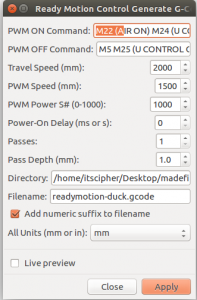
PWM ON COMMAND: Add any G-Code or M-Code commands here to start your working mode travel on the CNC.
PWM OFF COMAND: Add any G-Code or M-Code commands here to end your working mode travel on the CNC.
TRAVEL SPEED: The speed of the machine when the CNC is off working mode (mm/min).
PWM SPEED: The speed of the machine when the CNC is working mode (mm/min).
POWER ON DELAY: Used to delay from PWN ON COMMAND to the first movement.
PASSES: The Number of times to repeat the cycle.
PASS DEPTH: Z axis moves down by this amount for each pass.
DIRECTORY: Where to store the file generated.
FILENAME: The name of the generated file.
ADD NUMERIC SUFFIX: Add a number to the end of the file name so when the file is regenerated it wont copy over.
ALL UNITS: The unit to generate the G-Code
LIVE PREVIEW: Draw out the generation

Video using the Inkscape with the Ready Motion Plug-In